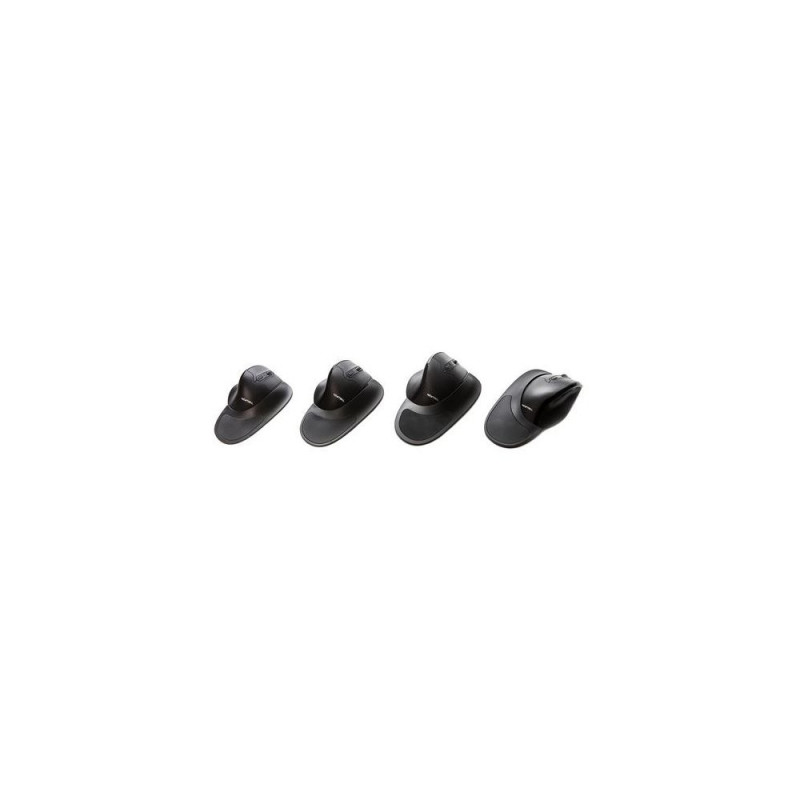
Microtouch Newtral3 Medium wireless mouse - righthanded

167,99 €

Monthly payment starting from 5,73 €

Open installments calculator

Photopoint hire purchase calculator

Please add some items to your shopping cart and choose "hire purchase" for the payment type

Main info

Warning: Last items in stock!

<b>Newtral mouse – The ergonomic mouse</b><br>The Newtral “Gripless” ergonomic mouse has been developed based on EMG (electromyogram) research amongst professional computer users, who (some more than others) suffer from physical complaints in the neck-schoulder area, arm, wrist or hand (like RSI/CANS). This research shows that the unique “saddle” shape of the Newtral mouse and the 33 degree slope, brings the hand in a more natural position while the fingers make use of gravity while clicking. This causes arguably less muscle tension in the neck, shoulder and fore-arm. The most return on investment (physically) will be reached when the Newtral ergonomic mouse is combined with a compact keyboard, this way the users can work within their “comfort zone”.<br><br><b>Reduces wrist and fore-arm rotation</b><br>The concave depression on the thumb side of the mouse, combined with the downward slope towards the fifth finger, positions the hand at a 33°degree angle off the horizontal. This is a much more natural position for your wrist and forearm.<br><br><b>Reduces wrist strain due to excessive movements</b><br>The Newtral ergonomic mouse offers a large flange accessory (Ergo-Grip), covering your palm and wrist. This way you’re encouraged to move your whole arm, instead of your wrist, to control the mouse. <br><br><b>Reduces pressure on your wrist</b><br>The soft gel applied on the large flange increases the size to bear your hand weight and reduces the pressure of your wrist.<br><br><b>Reduces “Pinch” grip</b><br>The slanted, semi-fist shape design allows gravitational force on the hand to be able to provide the majority of the control, required to precisely move the mouse. The need to grip the mouse, which is one cause of hand fatigue, is largely reduced.<br><br><b>Reduces friction between fifth finger and desk surface </b><br>The “Ergo-Grip” design, with detachable ledge, keeps the underside of the fifth finger and palm of your hand off the surface of the desk. This prevents skin irritation and discomfort while using the mouse.<br><br><b>Increases pointer precision</b><br>The “Precision Grip” design offers the utmost precision in fingertip control. There is no sacrificing of work efficiency, when enjoying the ergonomic comfort of the Newtral mouse.<br><br><b>Three different sizes to find the best fit for your hand</b><br>By choosing the best fit for your hand, you will gain the best physical result when using the Newtral ergonomic mouse. An ergonomic mouse that is too big or too small will cause too much strain on the smaller muscles in the hand/wrist. That is why we ask you to mesure your hand and choose between Small, Medium or Large size.<br><br><b>Easy to use. No learning curve</b><br>Plug and Play. Easy to adapt and no changes in workstyle.<br><br><b>DPI adjustable</b><br>Choose the mouse speed that you prefer.<br><br><b>6 Programmable buttons (only for wired version) </b><br>With the Newtral mouse driver you can program the function of the 6 buttons to your own preferences.<br><br><b>Gold-plated USB Connection</b><br>Excellent quality of resources to ensure you are always connected.<br><br><b>Soft Gel</b><br>The large flange accessory is folled with silicone gel, offering extra comfort for your wrist and hand palm.<br><br><b>Comfortable grip design</b><br>The concave depression on the thumb side of the mouse, combined with the downward slope towards the fifth finger, positions the hand at a 33 degree angle off the horizontal. This brings your wrist and forearm in a more neutral position to prevent from unnecessary rotation. <br><br><b>Neutral shape</b><br>The horizontal semi-fist shape is designed to fit your hand at a relaxed position, resting on the mouse instead of holding on to it.<br><br><b>The “Precision Grip”</b><br>This grip will give your fingertips the control you need, for example when drawing and online gaming.<br><br><b>The “Balance Grip”</b><br>Which gives you a balance between precision and comfort.<br><br><b>De “Ergo-Grip”</b><br>This is the most ergonomic shape for the Newtral mouse and supplies the maximum level of comfort when using the mouse in a professional environment. There is no sacrificing of work efficiency when using the “Ergo-Grip”.Microtouch Newtral3 Medium wireless mouse - righthanded. Form factor: Right-hand. Device interface: RF Wireless, Movement resolution: 2000 DPI, Buttons type: Pressed buttons, Buttons quantity: 6, Scroll type: Wheel. Power source: Batteries. Product colour: Black

Extended warranties and insurance:

  • Additional warranty (2 years) - 29,99 €
  • Additional warranty + insurance (2 + 1 year) - 39,99 €
  • Insurance (1 year) - 29,99 €
  • Insurance (2 years) - 49,99 €

Choose a suitable extended warranty and insurance in checkout..


Dimensions and weights

Package width
78 cm
Package height
55 cm
Package length
115 cm

Product codes

EAN
6926413911259
Manufacturer code
12002700W

Photopoint offers free shipping for orders over 99 € delivered to Estonia. Take a look in the tab "Delivery" for a more precise delivery estimate.

For this product you can select the desired delivery method at the shopping cart:

Photopoint store Pick-up


Place your order from Photopoint web store and pick your goods up from one of Photopoint`s brick and mortar stores. The delivery to Photopoint store is free even for orders less than 99 €. You will be noticed by e-mail when your order is ready for pick-up.

The Photopoint stores are located in Tallinn and Tartu. See the exact locations from here.

Omniva parcel terminal 

You can order the goods to one of the Omniva Parcel terminals. Choose the desired terminal at the shopping cart. As the shipment arrives to the selected terminal, you will be sent an SMS-notification with an unique code. Go to the terminal within a week, enter the code and take your package. It is as simple as that.

See Omniva Parcel terminal locations here.

SmartPOST parcel terminal

Did not find an Omniva terminal at suitable location? Try SmartPost. Choose the desired terminal at the shopping cart. As the shipment arrives to the selected terminal, you will be sent an SMS-notification with an unique code. Go to the terminal within a week, enter the code and take your package. This method actually works for all parcel terminals.

See SmartPOST parcel terminal locations here.

DPD parcel locker

Make sure you check out also the locations of DPD parcel lockers. These are located all over Estonia. The delivery is the same. As the shipment arrives to the selected locker, you will be sent an SMS with a unique code. Go to the locker, enter the code and take your package.

See DPD parcel locker locations here.

Smartpost Finland parcel terminal

SmartPOST Finland is the best way to order goods to Finland. These terminals work the same way as in Estonia. As the shipment arrives to the selected terminal in Finland, you will be sent an SMS-notification with an unique code. Go to the terminal, enter the code and take your package.

See SmartPOST Finland parcel terminal locations here.

Matkahuolto parcel service

Matkahuolto is easy way to order goods to Finland. These are located also in smaller Finnish towns. As the shipment arrives to the selected Matkahuolto outlet, you will be sent an SMS-notification or an e-mail. Go to the outlet, show your ID and take your package.

See Matkahuolto outlet locations here.

Omniva courier delivery

The courier will transport your goods from Photopoint straight to the provided address. The delivery will take place at workdays from 08:00 to 17:00. Hold your phone near you as the courier will call you prior to its arrival. Please make sure there is someone at the destination, eligible to receive the shipment. 

The product can only be ordered from our online store and it takes from 7-14 working days for delivery within Estonia.

Product comparison

Close