
- Customer support every day 9-21:00 Toll free hotline: 800 3686 Toll free hotline 9-21:00 800 3686 Stores
-
My account
-
My Photopoint
Login to your personal Photopoint account
-
New Customer?
Create an account
-
Product successfully added to your shopping cart
There are 0 items in your cart. There is 1 item in your cart.
Monthly payment starting from 5 €
If you wish, apply for hire purchase in checkout
Add 99 € and get a free shipping to parcel automat or by courier
-
Cameras
- Canon DSLRs
- Nikon DSLRs
- Pentax DSLRs
- Fujifilm Instax instant cameras
- Polaroid kiirpildikaamerad
- Canon instant cameras
- Kodak instant cameras
- DJI camera drones
Top DSLRs
Top instant cameras
Top camera drones
- Sony mirrorless cameras
- Fujifilm mirrorless cameras
- Panasonic mirrorless cameras
- OM System mirrorless cameras
- Canon mirrorless cameras
- Nikon mirrorless cameras
- Sony full frame mirrorless cameras
- Panasonic full-frame mirrorless cameras
- Nikon full-frame mirrorless cameras
- Canon full-frame mirrorless cameras
Top mirrorless cameras
Top full-frame mirrorless cameras
- 0 - 25 €
- 25 - 100 €
- 100 - 250 €
- 250 - 500 €
- 500 - 1000 €
- 1000 - ... €
- Canon
- Nikon
- Pentax
- Sony
- Fujifilm
- OM System
- Panasonic
- GoPro
- Polaroid
- Ricoh
Price range
Brand
-
Photo
- Lenses
- Filters
- Teleconverters
- Extension tubes
- Lens hoods
- Lens adapters
- Lens pouches
- Video lights
- Flashes
- Flash triggers
- Tripods
- Tripod heads
- Monopods
- Camera stabilizers
- All from category photo
Lenses and accessories
Flashes and video lights
Tripods
- Camera microphones
- Video monitors
- Remote control
- Battery grips
- Action cam accessories
- Memory cards
- USB flash drives
- External hard drives
- Optical discs
- Films
- Memory card readers
- Camera bags
- Camera straps
- Rain covers
Camera accessories
Recording media
Camera bags and accessories
- Photo frames
- Photo albums
- Passepartouts
- Photo boxes
- Photo stickers and glues
- Display protection
- Sensor cleaning
- Cleaning kits
- Cleaning wipes
- Lenspens
- Cleaning fluids
- Developing chemistry
- Photo paper
- Lab equipment
Archival accessories
Cleaning & protection
Darkroom
-
Computers & IT
- Cleaning
- Notebook bags
- Notebook chargers
- Monitor mounts
- Mousepads
- Cables
- Styli
- USB chargers
- Power banks
- USB hubs
- Routers
- Switches
- Network storage
- IP cameras
- 4G/5G routers
Accessories
Network devices
-
Electronics
-
Home & garden
- TVs
- Media players
- HiFi and home cinema
- Gaming consoles
- Vacuum cleaners
- Robot vacuum cleaners
- Filter bags
- Irons
- Screwdrivers
- Power screwdrivers
- Corded drills
- Cordless drills
- Angle grinders
- Circular saws
- Tool kit
Living room
Other home appliances
Power tools
-
Beauty & health
- Perfumes for women
- Eau de Toilette for women
- Eau de Cologne for women
- Sets for women
- Perfumes for men
- Eau de Toilette for men
- Eau de Cologne for men
- Sets for men
- Unisex perfumes
- Unisex Eau de Cologne
- Sunscreens
- Sunblocks
- After sun creams
- All from category beauty & health
Women's fragrance
Men's fragrance
Unisex fragrance
Tanning
- Shower gels
- Deosticks
- Soaps
- Disinfectants
- Body lotions
- Body creams
- Hand creams
- Epilators
- Hair removal
- Massage devices
- Facial creams
- Face serums
- Facial masks
- Eye creams
- Face scrubs
- Cleansers
Hygiene
Body and skin care
Facial care
- Lipsticks
- Lip gloss
- Mascara
- Eye shadows
- Eye liners
- Powders
- Foundations
- Concealers
- Make-up removers
- Shampoos
- Conditioners
- Hair clippers
- Hair straighteners
- Curling tongs
- Hair dryers
- Condoms
- Lubricants
- Toys and vibrators
Cosmetics
Hair care
Sexual health
- Electric toothbrushes
- Oral irrigators
- Toothpastes
- Shavers
- Beard trimmers
- Beard care
- Razors
- Nail polish
- Nail files
- Manicure and pedicure sets
- Foot baths
- Sunglasses
- Blue light glasses
- Jewelry
Oral care
Beard care
Manicure and pedicure
Accessories
-
Sport & hobbies
- Smartwatches
- Smartbands
- Sport watches
- Sports watch and smartwatch straps
- Handheld GPS
- Heart rate monitors
- Bicycles
- Tricycles
- Scooters
- Rulluisud
- Fitness
- Exercise machines
- Gym equipment
- Sports bags
- Smart scales
- Scales
- Blood pressure monitors
- Thermometers
- All from category sport & hobbies
Sport watches
Sport equipment
Health devices
- Electric scooters
- Electric bikes
- Self-balancing scooters
- Skateboards
- Sports shirts
- Training pants
- Sports shoes
- Tracksuits
- Sweatshirts
- Jackets
- Swimming clothes
- Ski wear
- Cycling clothing
- Thermoactive underwear
- Fishing supplies
- Art supplies
- Handicrafts
- Numismatics
- Philately
Transport
Sports clothing
Hobby supplies
- Gardening tools
- Garden power tools
- Cordless drills
- Hammer drills
- Corded drills
- Screwdrivers
- Tool kit
- Multi-tools
- Circular saws
- Angle grinders
- Glue guns
- Levels
- Measuring tapes
- Screws, nails, plugs etc
- Work clothes
- All from category "Tools"
- Alloy wheels
- Tires
- Car headlight bulbs
- Windshield wipers
- Spare parts
- GPS
- All from category "Automotive"
Do It Yourself
Automotive
-
Toys
- LEGO
- LEGO Duplo
- Other toy blocks
- Crafts
- Developmental toys
- Art supplies
- Musical toys
- Robotics kits
- Nukud
- Doll clothes
- Doll accessories
- Toy figures
Toy blocks
Crafts and learning
Dolls
- Stuffed toys
- Crib mobiles
- Bath toys
- Rattles
- Puzzles for babies
- Teething toys
- Baby play mats
- Activity centers
- Puzzle mats
- Toy cars
- Toy trains
- Slot cars
- Models
- Model paints and supplies
Toddlers and babys
Toy vehicles and models
- Board games
- Puzzles
- 3D-puzzles
- Card games
- Playing cards
- Interactive toys
- Kids' role playing toys
- Other toys
Board games and puzzles
Card games
Other toys
-
Auto
- Cleaning and polishing
- Paint and lacquer
- Engine oil
- Transmission fluids
- Fuel additives
- Engine coolants
- Screenwash
- Lubricants
- Other chemicals
- Helmets
- Protective gear
- Communication devices
- Motorcycle parts
Automotive chemicals
Motorcycle gear
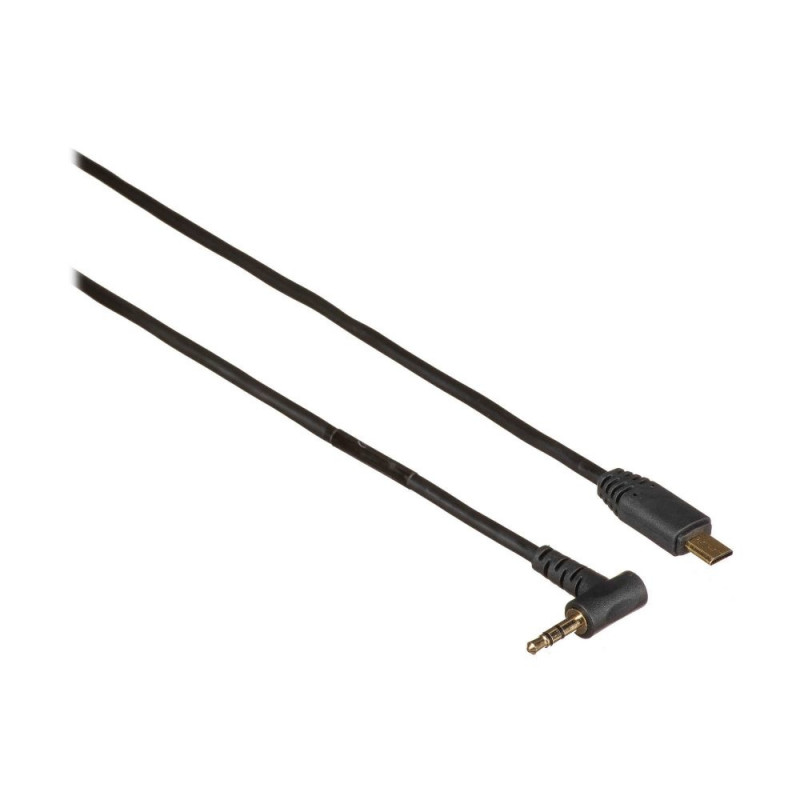
PocketWizard Remote Cable Sony Multi-Micro USB | ACC
20-S-VPR1-ACC
Main info
Product has been archived
The 91cm cable has a 1/8" stereo miniphone connection at one end and Sony's Multi/micro-USB attachment at the other.
How to Use
Connect the S-VPR1-ACC Remote Camera Cable to your camera’s remote port and a receiving PocketWizard radio. Trigger your remote camera by either pressing test on a handheld PocketWizard. You can also trigger a remote camera directly from your handheld camera’s shutter button. Attach the transmitting PocketWizard to your handheld camera’ s hot shoe or connected to the camera’s PC port.
Important note: If you are triggering from a handheld Sony camera with a PocketWizard in the hot shoe to a remote camera, especially if you wish to use electronic shutter, you must use this specific S-VPR1-ACC cable on the handheld camera. For the remote Sony camera, you can use either another S-VPR1-ACC, the 13377-S, or the 13369-S.
Compatibility
PocketWizard Compatibility: PocketWizard Plus III, Plus IV, and MultiMAX (with USB) transceivers
NOTE: For older Plus, Plus II, MultiMAX radios using top sync port, FlexTT5, and FlexTT6 radios, compatibility is not guaranteed. You may need to use an MSMM adapter adapter, a PTMM adapter, or use the 13377-S remote camera cable instead. If the camera sleeps, the remote radio may lock up. You can change the sleep timer in the camera to stay awake for up to 30 minutes on most cameras.
Camera Compatibility for Sony’s cameras with a multi/micro USB port including: Mirrorless cameras: Sony’s Alpha series including Alpha 1, Alpha 9 series, Alpha 7 series Compact cameras: Sony’s a6000 series
Note: For cameras with the Minolta L1000 or Sony RMS1AM remote ports, use the S-RMS1AM-ACC cable.
Half press / Pre Trigger Options for the Remote Camera
Enabling half press with the radios will pre trigger the remote camera. When half press / pre triggering is enabled, the remote camera behaves as if you were half pressing the shutter button directly on the camera itself. When pre triggered, the remote camera will focus and confirm exposure but not fire. The advantage of the half press feature is that your camera will respond to the actual trigger signal faster, as it should be completely ready to take the photo as soon as it gets the signal to fire. Half press is available “on demand” with some PocketWizard radios as a feature. Continuous half press is available to all PocketWizard radios if you add a PTMM cable.
Plus III/Plus IIIe: Using a hand held transmitting radio: half press the test button on the radio in your hand to pre trigger your remote camera, then press all the way to take the photo. If you are shooting from a handheld camera with a hot shoe mounted transmitting radio, use a remote camera cable on both the transmitting and receiving PocketWizard radios to enable pre triggering for the remote camera. When you half press the shutter button of the camera in your hand, the remote Plus III should pre trigger the remote camera at the same time.
Plus IV/Plus IVe: The Plus IV can receive a half press signal from a transmitting Plus III but cannot send one.
MultiMAX: You can pre trigger a remote camera using the MultiMAX radios by enabling or disabling their zones from a transmitting MultiMAX, Plus III, or Plus IV. This feature works when using the bottom -ACC port on a MultiMAX radio. It is not available on older MultiMAX radios that only have a top port.
The PTMM adapter can be added to any setup to enable constant pre triggering. It is an adapter that connects to the remote camera cable and has a box with a switch. When you turn it “on”, the camera will be constantly pre triggered. When it is “off”, the camera will fire after confirming focus and exposure. The camera will respond much more quickly but will use more battery power.
FlexTT5, FlexTT6, Plus II, Plus Receiver, MultiMAX without -ACC ports: half press / pre trigger is only available on these units by adding the PTMM adapter.
Specifications
From: 3.5 mm (1/8) stereo miniphone (male)
To: Sony’s Multi/Micro USB port (female)
Cable Length: 91 cm straight.
PocketWizard is the brand name for a line of photography accessories which allows photographers to be more creative. PocketWizard radios are the industry leaders in wireless control and synchronization of cameras, flash lighting and light meters. The world headquarters are based out of Shelburne, VT USA where a small group of dedicated employees continue to build the PocketWizard brand as the “must have” photography accessory.
Product codes
Photopoint offers free shipping for orders over 99 € delivered to Estonia. Take a look in the tab "Delivery" for a more precise delivery estimate.
For this product you can select the desired delivery method at the shopping cart:
Photopoint store Pick-up
Place your order from Photopoint web store and pick your goods up from one of Photopoint`s brick and mortar stores. The delivery to Photopoint store is free even for orders less than 99 €. You will be noticed by e-mail when your order is ready for pick-up.
The Photopoint stores are located in Tallinn and Tartu. See the exact locations from here.
Omniva parcel terminal
You can order the goods to one of the Omniva Parcel terminals. Choose the desired terminal at the shopping cart. As the shipment arrives to the selected terminal, you will be sent an SMS-notification with an unique code. Go to the terminal within a week, enter the code and take your package. It is as simple as that.
See Omniva Parcel terminal locations here.
SmartPOST parcel terminal
Did not find an Omniva terminal at suitable location? Try SmartPost. Choose the desired terminal at the shopping cart. As the shipment arrives to the selected terminal, you will be sent an SMS-notification with an unique code. Go to the terminal within a week, enter the code and take your package. This method actually works for all parcel terminals.
See SmartPOST parcel terminal locations here.
DPD parcel locker
Make sure you check out also the locations of DPD parcel lockers. These are located all over Estonia. The delivery is the same. As the shipment arrives to the selected locker, you will be sent an SMS with a unique code. Go to the locker, enter the code and take your package.
See DPD parcel locker locations here.
Smartpost Finland parcel terminal
SmartPOST Finland is the best way to order goods to Finland. These terminals work the same way as in Estonia. As the shipment arrives to the selected terminal in Finland, you will be sent an SMS-notification with an unique code. Go to the terminal, enter the code and take your package.
See SmartPOST Finland parcel terminal locations here.
Matkahuolto parcel service
Matkahuolto is easy way to order goods to Finland. These are located also in smaller Finnish towns. As the shipment arrives to the selected Matkahuolto outlet, you will be sent an SMS-notification or an e-mail. Go to the outlet, show your ID and take your package.
See Matkahuolto outlet locations here.
Omniva courier delivery
The courier will transport your goods from Photopoint straight to the provided address. The delivery will take place at workdays from 08:00 to 17:00. Hold your phone near you as the courier will call you prior to its arrival. Please make sure there is someone at the destination, eligible to receive the shipment.