- Klienditugi E-P 9-21:00 Infotelefon 800 3686 9-21:00 Infotelefon: 800 3686 Kauplused
-
Minu konto
-
Minu Photopoint
-
Oled uus klient?
Loo konto
-
Toode on lisatud ostukorvi
Sinu ostukorvis on 0 toodet. Sinu ostukorvis on 1 toode.
Kuumakse al. 5 €
Soovi korral taotle järelmaksu ostukorvis
Lisades tellimusse veel 99 € eest tooteid saad tasuta transpordi pakiautomaati või kulleriga koju.
-
Kaamerad
- Peegelkaamerad
- Hübriidkaamerad
- Kompaktkaamerad
- Seikluskaamerad
- Videokaamerad
- 360 kraadi kaamerad
- Autokaamerad
- Rajakaamerad
- Turvakaamerad
- Veebikaamerad
- Kiirpildikaamerad
- Filmiga fotokaamerad
- Ühekordsed kaamerad
- Kõik kategooriast kaamerad
Fotokaamerad
Videokaamerad
Analoogkaamerad
- Canon peegelkaamerad
- Nikon peegelkaamerad
- Pentax peegelkaamerad
- Fujifilm Instax kiirpildikaamerad
- Polaroid kiirpildikaamerad
- Canon kiirpildikaamerad
- Kodak kiirpildikaamerad
- DJI kaameradroonid
Top peegelkaamerad
Top kiirpildikaamerad
Top kaameradroonid
- Sony hübriidkaamerad
- Fujifilm hübriidkaamerad
- Panasonic hübriidkaamerad
- OM System hübriidkaamerad
- Canon hübriidkaamerad
- Nikon hübriidkaamerad
- Sony täiskaader hübriidkaamerad
- Panasonic täiskaader hübriidkaamerad
- Nikon täiskaader hübriidkaamerad
- Canon täiskaader hübriidkaamerad
Top hübriidkaamerad
Top täiskaader hübriidkaamerad
- 0 - 25 €
- 25 - 100 €
- 100 - 250 €
- 250 - 500 €
- 500 - 1000 €
- 1000 - ... €
- Canon
- Nikon
- Pentax
- Sony
- Fujifilm
- OM System
- Panasonic
- GoPro
- Polaroid
- Ricoh
Hinnaklass
Bränd
-
Fotokaubad
- Objektiivid
- Filtrid
- Telekonverterid
- Vaherõngad
- Päikesevarjukid
- Objektiivi adapterid
- Objektiivi vutlarid
- Videovalgustid
- Välgud
- Välgupäästikud
- Statiivid
- Statiivipead
- Üksjalad
- Kaamera stabilisaatorid
- Kõik kategooriast fotokaubad
Objektiivid ja tarvikud
Välgud ja videovalgustid
Statiivid
- Kaamera mikrofonid
- Videomonitorid
- Kaugjuhtimine
- Patareitallad
- Seikluskaamerate tarvikud
- Mälukaardid
- USB mälupulgad
- Välised kõvakettad
- Toorikud
- Filmid
- Mälukaardilugejad
- Kaamerakotid
- Kaamerarihmad
- Vihmakaitsed
Kaamera lisatarvikud
Salvestusmeedia
Fotokotid ja tarvikud
- Pildiraamid
- Albumid
- Paspartuud
- Fotokarbid
- Fotonurgad ja liimid
- Ekraani kaitse
- Sensori puhastus
- Puhastuskomplektid
- Puhastuslapid
- Puhastuspliiatsid
- Puhastusvedelikud
- Kemikaalid
- Fotopaber
- Laboritarvikud
Arhiveerimistarvikud
Puhastus ja kaitse
Labor
-
Arvuti & IT
-
Elektroonika
- Autoraadiod
- Auto helisüsteem
- GPS seadmed
- Telefoni autohoidikud
- Autolaadijad
- Autokaubad
- Televiisorid
- Kodukino komplektid
- DVD ja Blu-ray mängijad
- Ressiiverid ja võimendid
- Projektorid
- Meediapleierid
- Mängukonsoolid
- Digitaalsed pildiraamid
- Droonid
- Kaugjuhitavad mänguasjad
- Kõik kategooriast elektroonika
Autosse
Elutuppa
Õue
-
Kodu & aed
-
Ilu & tervis
- Naiste parfüümid, lõhnad ja lõhnaõlid
- Tualettveed naistele
- Kölni veed naistele
- Lõhnakomplektid naistele
- Meeste lõhnad, parfüümid ja lõhnaõlid
- Tualettveed meestele
- Kölni veed meestele
- Lõhnakomplektid meestele
- Unisex parfüümid
- Unisex Kölni veed
- Päevituskreemid
- Päikesekaitsekreemid
- Päevitusjärgsed kreemid
- Kõik kategooriast ilu & tervis
Naiste lõhnad
Meeste lõhnad
Unisex-lõhnad
Päevitus
- Dušigeelid
- Deodorandid
- Seebid
- Desinfitseerimisvahendid
- Ihupiimad
- Kehakreemid
- Kätekreemid
- Epilaatorid
- Karvaeemaldus
- Massaaživahendid
- Näokreemid
- Näoseerumid
- Näomaskid
- Silmaümbruse kreemid
- Näokoorijad
- Näopuhastajad
Hügieen
Keha- ja nahahooldus
Näohooldus
- Elektrilised hambaharjad
- Suupesurid
- Hambapastad
- Pardlid ja habemeajamismasinad
- Habemepiirajad
- Habeme hooldusvahendid
- Žiletid
- Küünelakid
- Küüneviilid
- Maniküüri ja pediküüri komplektid
- Jalavannid
- Päikeseprillid
- Sinise valguse prillid
- Ehted
Suuhooldus
Habemehooldus
Maniküür ja pediküür
Aksessuaarid
-
Sport & hobi
- Nutikellad meestele, naistele ja lastele
- Nutivõrud
- Spordikellad
- Spordikellade ja nutikellade rihmad
- Käsi-GPS'id
- Pulsiandurid
- Jalgrattad
- Lasterattad
- Tõukerattad
- Rulluisud
- Fitness
- Trenažöörid
- Jõusaalivarustus
- Spordikotid
- Nutikaalud
- Kaalud
- Vererõhumõõtjad
- Termomeetrid
- Kõik kategooriast sport & hobi
Spordikellad
Spordikaubad
Terviseseadmed
- Aiatööriistad
- Aiatehnika
- Akutrellid
- Lööktrellid
- Juhtmega trellid
- Kruvikeerajad
- Tööriistakomplektid
- Multitööriistad
- Ketassaed
- Nurklihvijad
- Liimipüstolid
- Loodid
- Mõõdulindid
- Kruvid, naelad, tüüblid jm
- Tööriided ja kaitsevahendid
- Kõik kategooriast "Tööriistad"
- Valuveljed
- Rehvid
- Esitulede pirnid
- Klaasipuhastajad
- Varuosad
- GPS seadmed
- Kõik kategooriast "Autokaubad"
Tee seda ise
Autokaubad
-
Mänguasjad
- Kaugjuhitavad mänguasjad
- Kaugjuhitavad autod
- Kaugjuhitavad lennukid ja helikopterid
- Droonid
- Mänguasjad õue
- Mänguasjad randa
- Liivakasti mänguasjad
- Mängu- ja veepüstolid
- Pealeistutavad sõidukid
- Hüppepallid
- Pallid
- Mullitajad
- Mängumajad ja liumäed
- Kiiged
- Kõik kategooriast mänguasjad
Kaugjuhitavad mänguasjad
Aktiivne tegevus
- Pehmed mänguasjad ja mänguloomad
- Voodikarussellid
- Mänguasjad vanni
- Kõristid
- Beebipusled
- Närimisrõngad
- Tegelustekid
- Mängukeskused
- Puslematid
- Mänguautod
- Mängurongid
- Sõidurajad ja tarvikud
- Mudelid
- Mudelite värvid ja tarvikud
Beebid ja väikelapsed
Mängusõidukid ja mudelid
- Lauamängud lastele, täiskasvanutele, kogu perele
- Puslede müük firmadelt Ravensburger, Trefl ja mitmetelt teistelt
- 3D-pusled
- Kaardimängud
- Mängukaardid
- Interaktiivsed mänguasjad
- Laste rollimängud
- Muud mänguasjad
Lauamängud ja pusled
Kaardimängud
Muud mänguasjad
-
Auto
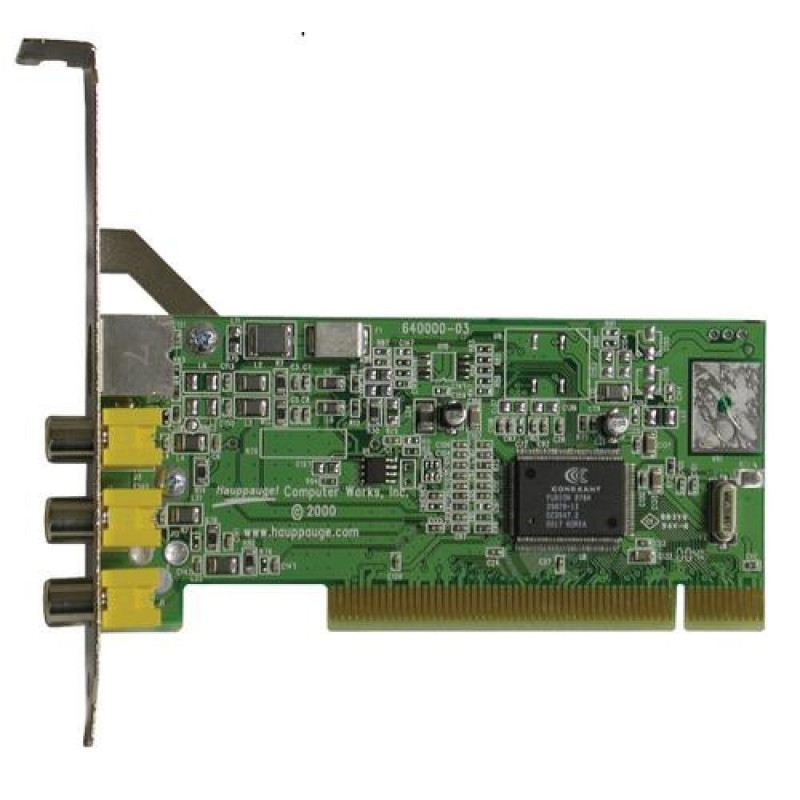
Hauppauge 01381 interface cards/adapter Internal
118-M785428013817
11% (lisa)allahindlust
(min. 5€ ostul)
Põhiinfo
<b>ImpactVCB: low cost video capture boards with live overlay which can be used as the heart of a live video display, real time video capture, streaming video or video conferencing solutions</b><br><br><b>The ImpactVCB pOsta kohe, viimased eksemplarid laos!
Vabandage, tooteandmed on tõlkimisel. Kui vajate toote võõrkeelse teksti mõistmisel abi, andke sellest palun teada e-posti teel info@photopoint.ee. Saadame teile kiirelt soovitud tõlke.
<b>ImpactVCB: low cost video capture boards with live overlay which can be used as the heart of a live video display, real time video capture, streaming video or video conferencing solutions</b><br><br><b>The ImpactVCB product family</b><br>- ImpactVCB-e model 01381board is a half height PCI Express board for Windows 7 (32-bit and 64-bit) with one S-Video and one composite video imput, plus audio inputs.<br>- Impact VCB model 00166 board is a small 1/3 height PCI board based on the Conexant 878A video digitizer chip. It has 32-bit support with Windows XP.<br>- Impact VCB model 00558 board is a full height PCI board based on the Conexant 878A video digitizer chip with three S-Video and one composite video input. It has 32-bit support with Windows XP.<br>- Impact VCB model 00188 board is a full height PCI board based on the Conexant 878A video digitizer chip with four BNC connected composite video inputs. It has 32-bit support with Windows XP.<br><br><b>The ImpactVCB PCI Express board</b><br>The ImpactVCB-e is the new PCI Express video capture product. Compatible with Windows 7 (both 64-bit and 32-bit), ImpactVCB-e is a low profile board which is supplied with both a full height and half height brackets.<br><br><b>The ImpactVCB PCI boards</b><br>It requires a bus-master PCI slot. A VGA card with Direct Draw 3 (or later) capability is required for Live Display. Operating system can be WindowsXP, Window 95, Windows 98, WindowsME, NT 4.0, Windows 2000. Third party Linux drivers are available. Drivers are provided with the ImpactVCB board. Incoming image is digitized using high quality 4:2:2 video sampling and displayed in a window on the PC's VGA screen. The image is transmitted directly by the ImpactVCB into main system memory or the memory of the VGA adapter for high performance results. The ImpactVCB comes in several different I/O configurations, with up to four composite video inputs, s-video input, power output (primarily to drive a CCD camera) and an optional audio input. A Programmers Toolkit is available for the ImpactVCB which provides both DLL and OCX support for applications requiring the ImpactVCB's video capture or video display. Applications can be developed in C or Visual Basic.<br><br>Product Availability<br>Hauppauge has a variety of ImpactVCB boards to support your image capture, video image display, industrial image processing and video conferencing applications worldwide. Please note that our technical support organization is available to provide technical information you require to support your applications. Special models are available which use BNC connectors.<br><br>All ImpactVCB models support both PAL and NTSC compatibility (referred to as "dual crystal").<br><br><b>Video Capture</b><br>Video from any analog source (composite or S-Video) can be captured as either still frame video images or motion video. Composite video inputs are provided as female RCA jacks, while S-Video uses standard 4-pin DIN connectors. The PCI based ImpactVCB boards come with a VFW capture driver (Video for Windows) for Windows 95 and Windows NT, and a WDM driver for use with WindowsXP, Windows98SE, Windows Me and Windows 2000. Typical capture rates range from 15 to 30 fps depending on system configuration.<br><br><b>Live Video Display</b><br>The ImpactVCB can display live video from NTSC or PAL video sources in a resizable window on the PC screen. The digitizing of the analog video signal and the resizing of the video image is performed by hardware on the ImpactVCB, thereby not slowing down the CPU. After video is digitized and resized, the digitized video image is drawn by the ImpactVCB directly into the memory of the PC's VGA card. This uses a feature of Windows called Direct Draw, and the ImpactVCB can be used with most VGA cards which support Direct Draw 5 or higher. This technique is used on Windows95, Windows98, WindowsME, Windows2000 and WindowsNT 4.0<br><br>Serialization<br>Some ImpactVCB models have a unique serial number burnt into an EProm on board. The serial number is read either through the Hauppauge WinTV Programmers Toolkit or can be read via Windows Control Panel. In addition to the serial number, these models of ImpactVCB have its I/O configuration burnt into the EProm.Hauppauge 01381. Host interface: PCI. Product colour: Green
Toote koodid
Kuidas kaup minuni jõuab?
Alates 99 € tellimuste transport on Eesti-siseselt tasuta. Toote täpsemat tarneaega vaata vahelehelt "Saadavus".
Selle toote puhul saad valida ühe järgmistest tarneviisidest:
Photopointi kauplusesse
Väiksemate toodete puhul on mugav minna kaubale järele Photopointi esinduskauplusesse. Nii on kauba kättesaamine Sinu jaoks täiesti tasuta, sest kauplusesse tellides ei lisandu postikulu ka siis, kui tellimus jääb alla 99 €. Kauba kauplusesse jõudmisest antakse Sulle teada e-kirja teel.
Photopointi kauplused asuvad Tallinnas ja Tartus. Täpsemalt saad poodide asukohti ja kontaktandmeid vaadata siit.
Omniva pakiautomaati
Vali kättesaamise kohaks endale sobivaim Omniva pakiautomaat. Kui pakk automaati jõuab, saadetakse Sulle SMS koos unikaalse koodiga. Mine kohale, sisesta kood automaati ja võta pakk. Nii lihtne ongi. Omniva pakiautomaadid asuvad hoonetest väljas – nii saad pakile järele minna olenemata kellaajast ja kuupäevast.
Lähima pakiautomaadi saad Photopointi veebipoes valida ostukorvis, tarneviisi juures olevast nimekirjast. Omniva kõikide pakiautomaatide asukohti saad vaadata siit.
SmartPOST pakiautomaati
Ehk on Sinule sobivaimas kohas hoopis SmartPOST pakiautomaat? Kui nii, siis vali Photopointi veebipoes ostukorvis tarneviisiks see sobivaim. Kui pakk automaati jõuab, saadetakse Sulle SMS koos unikaalse koodiga. Mine kohale, sisesta kood automaati ja võta pakk. Kiire ja lihtne.
Kõikide SmartPOST pakiautomaatide asukohti saad vaadata siit.
DPD pakiautomaati
Vaata kindlasti üle ka DPD pakiautomaatide asukohad. Neid on tänaseks juba üle Eesti. Vali Photopointi veebipoes ostukorvis sobiv DPD pakiautomaat ning kui pakk kohale jõuab, saadetakse Sulle SMSiga kood.
DPD pakiautomaatide asukohti saad vaadata siit.
SmartPOST Finland pakiautomaati
Telli kaup endale Soome või saada see enda Soomes elavale sõbrale. SmartPOST Finland pakiautomaadid toimivad sama lihtsalt nagu Eestisisesed automaadid. Vali Photopointi veebipoes ostukorvis sobiv SmartPOST Finland automaat. Kui pakk kohale jõuab, saadetakse saajale SMS koos unikaalse koodiga. Mine kohale, sisesta kood automaati ja võta pakk.
SmartPOST Finland automaatide asukohti saad vaadata siit.
Matkahuolto väljastuspunkti Soomes
Telli kaup Soome või saada see enda Soomes elavale sõbrale. Vali Photopointi veebipoes ostukorvis sobiv Matkahuolto väljastuspunkt ning kui pakk kohale jõuab, saadetakse Sulle SMS või e-mail teavitusega. Mine kohale, näita isikut tõendavat dokumenti ja võta pakk.
Matkahuolto teeninduspunkte saad vaadata siit.
Kulleriga koju või kontorisse
Kulleriga saad kauba tellida koju, kontorisse või mujale, kus kauba kätte toimetamise ajal viibid. Kaup toimetatakse aadressile tööpäevadel kella 08:00-17:00.
Enne kauba kohale jõudmist helistab kuller kontaktile. Kaupa "koju" tellides hoolitse, et telefon oleks käepärast ning volitatud isik kauba kohale jõudmise ajal sihtkohas seda vastu võtmas. Eriti just suuremate esemete tellimisel palume arvestada, et kuller toimetab kauba vaid välisukseni.
Toode on saadaval Photopointi veebipoes 7-14 tööpäevase tarneajaga. Esinduskauplustes kohapeal seda toodet müügil ei ole.