- Klienditugi E-P 9-21:00 Infotelefon 800 3686 9-21:00 Infotelefon: 800 3686 Kauplused
-
Minu konto
-
Minu Photopoint
-
Oled uus klient?
Loo konto
-
Toode on lisatud ostukorvi
Kogus
Kokku:
Sinu ostukorvis on 0 toodet. Sinu ostukorvis on 1 toode.
Tooted kokku:
0 €
Kuumakse al. 5 €
Soovi korral taotle järelmaksu ostukorvis
Jätka ostlemist
Ostu vormistama
-
Kaamerad
- Peegelkaamerad
- Hübriidkaamerad
- Kompaktkaamerad
- Seikluskaamerad
- Videokaamerad
- 360 kraadi kaamerad
- Autokaamerad
- Rajakaamerad
- Turvakaamerad
- Veebikaamerad
- Kiirpildikaamerad
- Filmiga fotokaamerad
- Ühekordsed kaamerad
- Kõik kategooriast kaamerad
Fotokaamerad
Videokaamerad
Analoogkaamerad
- Canon peegelkaamerad
- Nikon peegelkaamerad
- Pentax peegelkaamerad
- Fujifilm Instax kiirpildikaamerad
- Polaroid kiirpildikaamerad
- Canon kiirpildikaamerad
- Kodak kiirpildikaamerad
- DJI kaameradroonid
Top peegelkaamerad
Top kiirpildikaamerad
Top kaameradroonid
- Sony hübriidkaamerad
- Fujifilm hübriidkaamerad
- Panasonic hübriidkaamerad
- OM System hübriidkaamerad
- Canon hübriidkaamerad
- Nikon hübriidkaamerad
- Sony täiskaader hübriidkaamerad
- Panasonic täiskaader hübriidkaamerad
- Nikon täiskaader hübriidkaamerad
- Canon täiskaader hübriidkaamerad
Top hübriidkaamerad
Top täiskaader hübriidkaamerad
- 0 - 25 €
- 25 - 100 €
- 100 - 250 €
- 250 - 500 €
- 500 - 1000 €
- 1000 - ... €
- Canon
- Nikon
- Pentax
- Sony
- Fujifilm
- OM System
- Panasonic
- GoPro
- Polaroid
- Ricoh
Hinnaklass
Bränd
-
Fotokaubad
- Objektiivid
- Filtrid
- Telekonverterid
- Vaherõngad
- Päikesevarjukid
- Objektiivi adapterid
- Objektiivi vutlarid
- Videovalgustid
- Välgud
- Välgupäästikud
- Statiivid
- Statiivipead
- Üksjalad
- Kaamera stabilisaatorid
- Kõik kategooriast fotokaubad
Objektiivid ja tarvikud
Välgud ja videovalgustid
Statiivid
- Kaamera mikrofonid
- Videomonitorid
- Kaugjuhtimine
- Patareitallad
- Seikluskaamerate tarvikud
- Mälukaardid
- USB mälupulgad
- Välised kõvakettad
- Toorikud
- Filmid
- Mälukaardilugejad
- Kaamerakotid
- Kaamerarihmad
- Vihmakaitsed
Kaamera lisatarvikud
Salvestusmeedia
Fotokotid ja tarvikud
- Pildiraamid
- Albumid
- Paspartuud
- Fotokarbid
- Fotonurgad ja liimid
- Ekraani kaitse
- Sensori puhastus
- Puhastuskomplektid
- Puhastuslapid
- Puhastuspliiatsid
- Puhastusvedelikud
- Kemikaalid
- Fotopaber
- Laboritarvikud
Arhiveerimistarvikud
Puhastus ja kaitse
Labor
-
Arvuti & IT
-
Elektroonika
- Autoraadiod
- Auto helisüsteem
- GPS seadmed
- Telefoni autohoidikud
- Autolaadijad
- Autokaubad
- Televiisorid
- Kodukino komplektid
- DVD ja Blu-ray mängijad
- Ressiiverid ja võimendid
- Projektorid
- Meediapleierid
- Mängukonsoolid
- Digitaalsed pildiraamid
- Droonid
- Kaugjuhitavad mänguasjad
- Kõik kategooriast elektroonika
Autosse
Elutuppa
Õue
-
Kodu & aed
-
Ilu & tervis
- Naiste parfüümid, lõhnad ja lõhnaõlid
- Tualettveed naistele
- Kölni veed naistele
- Lõhnakomplektid naistele
- Meeste lõhnad, parfüümid ja lõhnaõlid
- Tualettveed meestele
- Kölni veed meestele
- Lõhnakomplektid meestele
- Unisex parfüümid
- Unisex Kölni veed
- Päevituskreemid
- Päikesekaitsekreemid
- Päevitusjärgsed kreemid
- Kõik kategooriast ilu & tervis
Naiste lõhnad
Meeste lõhnad
Unisex-lõhnad
Päevitus
- Dušigeelid
- Deodorandid
- Seebid
- Desinfitseerimisvahendid
- Ihupiimad
- Kehakreemid
- Kätekreemid
- Epilaatorid
- Karvaeemaldus
- Massaaživahendid
- Näokreemid
- Näoseerumid
- Näomaskid
- Silmaümbruse kreemid
- Näokoorijad
- Näopuhastajad
Hügieen
Keha- ja nahahooldus
Näohooldus
- Elektrilised hambaharjad
- Suupesurid
- Hambapastad
- Pardlid ja habemeajamismasinad
- Habemepiirajad
- Habeme hooldusvahendid
- Žiletid
- Küünelakid
- Küüneviilid
- Maniküüri ja pediküüri komplektid
- Jalavannid
- Päikeseprillid
- Sinise valguse prillid
- Ehted
Suuhooldus
Habemehooldus
Maniküür ja pediküür
Aksessuaarid
-
Sport & hobi
- Nutikellad meestele, naistele ja lastele
- Nutivõrud
- Spordikellad
- Spordikellade ja nutikellade rihmad
- Käsi-GPS'id
- Pulsiandurid
- Jalgrattad
- Lasterattad
- Tõukerattad
- Rulluisud
- Fitness
- Trenažöörid
- Jõusaalivarustus
- Spordikotid
- Nutikaalud
- Kaalud
- Vererõhumõõtjad
- Termomeetrid
- Kõik kategooriast sport & hobi
Spordikellad
Spordikaubad
Terviseseadmed
- Aiatööriistad
- Aiatehnika
- Akutrellid
- Lööktrellid
- Juhtmega trellid
- Kruvikeerajad
- Tööriistakomplektid
- Multitööriistad
- Ketassaed
- Nurklihvijad
- Liimipüstolid
- Loodid
- Mõõdulindid
- Kruvid, naelad, tüüblid jm
- Tööriided ja kaitsevahendid
- Kõik kategooriast "Tööriistad"
- Valuveljed
- Rehvid
- Esitulede pirnid
- Klaasipuhastajad
- Varuosad
- GPS seadmed
- Kõik kategooriast "Autokaubad"
Tee seda ise
Autokaubad
-
Mänguasjad
- Kaugjuhitavad mänguasjad
- Kaugjuhitavad autod
- Kaugjuhitavad lennukid ja helikopterid
- Droonid
- Mänguasjad õue
- Mänguasjad randa
- Liivakasti mänguasjad
- Mängu- ja veepüstolid
- Pealeistutavad sõidukid
- Hüppepallid
- Pallid
- Mullitajad
- Mängumajad ja liumäed
- Kiiged
- Kõik kategooriast mänguasjad
Kaugjuhitavad mänguasjad
Aktiivne tegevus
- Pehmed mänguasjad ja mänguloomad
- Voodikarussellid
- Mänguasjad vanni
- Kõristid
- Beebipusled
- Närimisrõngad
- Tegelustekid
- Mängukeskused
- Puslematid
- Mänguautod
- Mängurongid
- Sõidurajad ja tarvikud
- Mudelid
- Mudelite värvid ja tarvikud
Beebid ja väikelapsed
Mängusõidukid ja mudelid
- Lauamängud lastele, täiskasvanutele, kogu perele
- Puslede müük firmadelt Ravensburger, Trefl ja mitmetelt teistelt
- 3D-pusled
- Kaardimängud
- Mängukaardid
- Interaktiivsed mänguasjad
- Laste rollimängud
- Muud mänguasjad
Lauamängud ja pusled
Kaardimängud
Muud mänguasjad
-
Auto
Pealeht
»
Arvuti & IT»Printerid ja tarvikud»Printerid»Maxify multifunktsionaalne printer GX6150 USB LAN WLAN skaneerimine kopeerimine faks kahepoolne prin
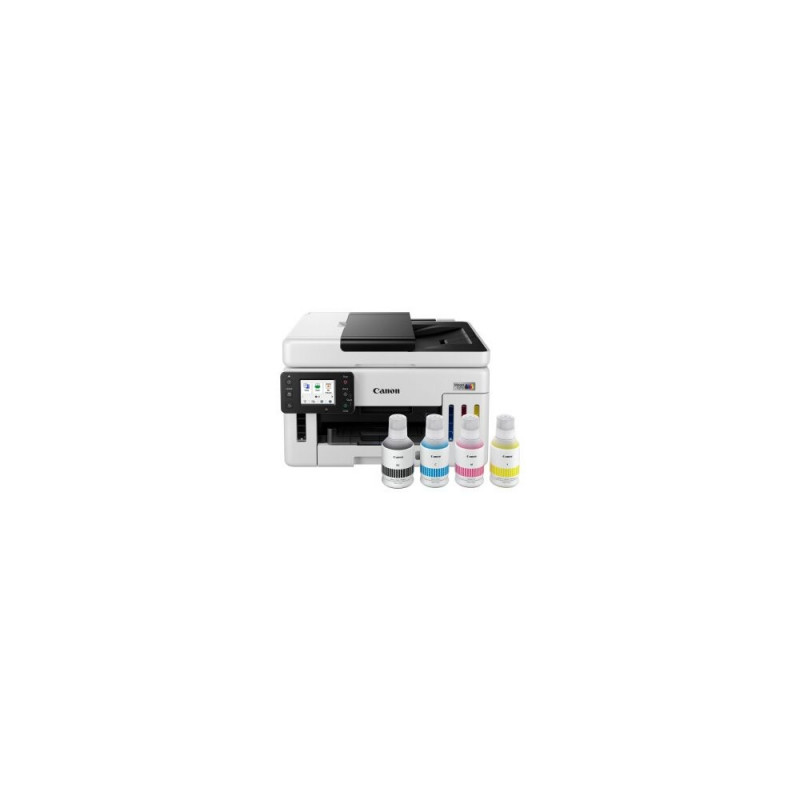
Maxify multifunktsionaalne printer GX6150 USB LAN WLAN skaneerimine kopeerimine faks kahepoolne prin
55-100122313
TASUTA TRANSPORT!
689 €
Põhiinfo
Osta kohe, viimased eksemplarid laos!
Selle tootekirjelduse loomisel on abiks olnud tehisintellekt.
Ülevaade
Liidestus ja võrgufunktsioonid
Dokumendihaldus ja efektiivsus
Disain ja kasutusmugavus
Tehnilised andmed
Canon Maxify GX6150 on mitmeotstarbeline kontoriprinter, mis ühendab trüki, skannimise, kopeerimise ja faksi võimalused kompaktseks lahenduseks, pakkudes mitmekülgset ühenduvust ja kahepoolset trükkimist.
- Mitmefunktsiooniline (trükk, skann, kopeeri, faks) — säästad ruumi ja töövoogu, kui kõik vajalikud dokumenditöötluse funktsioonid on ühes seadmes.
- USB, LAN ja WLAN ühenduvus — paindlik paigutus ja lihtne jagamine kontoris nii kaabliga kui juhtmevabalt.
- Kahepoolne trükkimine (duplex) — vähendab paberi kasutust ja professionaalsemat dokumentide vormistust.
- Halli viimistlusega korpus — diskreetne ja kontorisse sobiv disain.
Ülevaade
Canon Maxify GX6150 pakub kompaktset ja praktilist lahendust väikeettevõtetele või kodukontorile, kus on oluline paindlikkus dokumentide töötlemisel. Seade koondab ühe korpuse alla trüki-, koopereerimis-, skannimis- ja faksifunktsioonid, vähendades vajadust eraldi seadmete järele.
Liidestus ja võrgufunktsioonid
Printeril on mitmekülgsed ühendusvõimalused: USB-liides kohalikuks ühendamiseks, Ethernet (LAN) võrgus jagamiseks ning traadita (WLAN) ühendus mugavaks printimiseks eri seadmetelt ilma kaablita. See võimaldab sul valida paindliku paigutuse ja hõlpsa ligipääsu erinevatest töökohtadest.
Dokumendihaldus ja efektiivsus
Mitmefunktsioonilise seadmena aitab Maxify GX6150 tõhustada igapäevaseid tööprotsesse — skannid dokumendid kiirelt digitaalseks, kopeerid lehekülgi otse seadmes ja vajadusel saadan või vastu võtan fakse. Kahepoolne trükkimine vähendab paberikulu ning annab dokumentidele viimistletuma välimuse.
Disain ja kasutusmugavus
Hall viimistlus sobitub professionaalsesse töökeskkonda ning kompaktne korpus aitab hoida töölaua vabana. Seade on mõeldud regulaarseks kontorikasutuseks, kus väärtustatakse mitmekülgsust ja lihtsat ühenduvust.
Tehnilised andmed
- Mudel: Canon Maxify GX6150
- EAN: 4549292240375
- Värv: hall
- Funktsioonid: trükkimine, skannimine, kopeerimine, faks
- Ühenduvus: USB, LAN (Ethernet), WLAN (Wi‑Fi)
- Kahepoolne trükkimine: jah (duplex)
- Mõeldud kasutamiseks kontori-/kodukontori keskkonnas
- Toetatavad paberiformaadid: tavalised kontoripaberid, sh A4
- Seadme tüüp: mitmeotstarbeline tindiprinter
Vali printerile e-poest koheselt lisaks: sobivas pikkuses USB kaabel ›
Lisagarantiid ja kindlustused:
- Lisagarantii + kindlustus (2 + 1 aastat) - 129,99 €
- Lisagarantii (2 aastat) - 79,99 €
- Kindlustus (1 aasta) - 119,99 €
- Kindlustus (2 aastat) - 189,99 €
Sobiva lisagarantii ja kindlustuse saad valida ostukorvis.
Mõõtmed ja kaalud
Brutokaal
15.25 kg
Toote koodid
EAN
4549292240375
Tootja kood
6882C006
Kuidas kaup minuni jõuab?
Alates 99 € tellimuste transport on Eesti-siseselt tasuta. Toote täpsemat tarneaega vaata vahelehelt "Saadavus".
Selle toote puhul saad valida ühe järgmistest tarneviisidest:
Photopointi kauplusesse
Väiksemate toodete puhul on mugav minna kaubale järele Photopointi esinduskauplusesse. Nii on kauba kättesaamine Sinu jaoks täiesti tasuta, sest kauplusesse tellides ei lisandu postikulu ka siis, kui tellimus jääb alla 99 €. Kauba kauplusesse jõudmisest antakse Sulle teada e-kirja teel.
Photopointi kauplused asuvad Tallinnas ja Tartus. Täpsemalt saad poodide asukohti ja kontaktandmeid vaadata siit.
Omniva pakiautomaati
Vali kättesaamise kohaks endale sobivaim Omniva pakiautomaat. Kui pakk automaati jõuab, saadetakse Sulle SMS koos unikaalse koodiga. Mine kohale, sisesta kood automaati ja võta pakk. Nii lihtne ongi. Omniva pakiautomaadid asuvad hoonetest väljas – nii saad pakile järele minna olenemata kellaajast ja kuupäevast.
Lähima pakiautomaadi saad Photopointi veebipoes valida ostukorvis, tarneviisi juures olevast nimekirjast. Omniva kõikide pakiautomaatide asukohti saad vaadata siit.
SmartPOST pakiautomaati
Ehk on Sinule sobivaimas kohas hoopis SmartPOST pakiautomaat? Kui nii, siis vali Photopointi veebipoes ostukorvis tarneviisiks see sobivaim. Kui pakk automaati jõuab, saadetakse Sulle SMS koos unikaalse koodiga. Mine kohale, sisesta kood automaati ja võta pakk. Kiire ja lihtne.
Kõikide SmartPOST pakiautomaatide asukohti saad vaadata siit.
DPD pakiautomaati
Vaata kindlasti üle ka DPD pakiautomaatide asukohad. Neid on tänaseks juba üle Eesti. Vali Photopointi veebipoes ostukorvis sobiv DPD pakiautomaat ning kui pakk kohale jõuab, saadetakse Sulle SMSiga kood.
DPD pakiautomaatide asukohti saad vaadata siit.
SmartPOST Finland pakiautomaati
Telli kaup endale Soome või saada see enda Soomes elavale sõbrale. SmartPOST Finland pakiautomaadid toimivad sama lihtsalt nagu Eestisisesed automaadid. Vali Photopointi veebipoes ostukorvis sobiv SmartPOST Finland automaat. Kui pakk kohale jõuab, saadetakse saajale SMS koos unikaalse koodiga. Mine kohale, sisesta kood automaati ja võta pakk.
SmartPOST Finland automaatide asukohti saad vaadata siit.
Matkahuolto väljastuspunkti Soomes
Telli kaup Soome või saada see enda Soomes elavale sõbrale. Vali Photopointi veebipoes ostukorvis sobiv Matkahuolto väljastuspunkt ning kui pakk kohale jõuab, saadetakse Sulle SMS või e-mail teavitusega. Mine kohale, näita isikut tõendavat dokumenti ja võta pakk.
Matkahuolto teeninduspunkte saad vaadata siit.
Kulleriga koju või kontorisse
Kulleriga saad kauba tellida koju, kontorisse või mujale, kus kauba kätte toimetamise ajal viibid. Kaup toimetatakse aadressile tööpäevadel kella 08:00-17:00.
Enne kauba kohale jõudmist helistab kuller kontaktile. Kaupa "koju" tellides hoolitse, et telefon oleks käepärast ning volitatud isik kauba kohale jõudmise ajal sihtkohas seda vastu võtmas. Eriti just suuremate esemete tellimisel palume arvestada, et kuller toimetab kauba vaid välisukseni.
Toode on saadaval Photopointi veebipoes 12-17 tööpäevase tarneajaga. Esinduskauplustes kohapeal seda toodet müügil ei ole.